I once reviewed a network monitoring system where the monitoring system required only the read access to linux and windows machines like reading syslogs, available memory, disk space etc. But the service account created for this system had been given full root access on Linux machine and admin access on windows machine. Nobody could tell me why. That’s the opposite of least privilege, and it’s more common than you’d think.
Every business today is, in some sense, a software business. Applications aren’t just supporting the enterprise anymore — for most companies, they are the enterprise. That shift means security can no longer live entirely inside a specialized security team; it has to be a working part of how software gets built, not a review that happens after the fact.
Modern developers are expected to build applications that are scalable, useful, and resistant to increasingly sophisticated attacks — all at once. That means security has to be designed into every phase of the Software Development Life Cycle (SDLC), not bolted on at the end. This post covers the core principles that make that possible: ideas that show up constantly in real system design, real security reviews, and real incident postmortems.
The Foundation: The CIA Triad
Every one of the principles in this post ultimately serves the same three goals — Confidentiality, Integrity, and Availability, together known as the CIA Triad. If you want the full breakdown of how these three interact and where organizations commonly get the balance wrong, see The CIA Triad Explained. For this post, the short version: every principle below is really just a practical way of protecting one or more of these three properties.
Limiting the Attack Surface: The Principle of Least Privilege (PoLP)
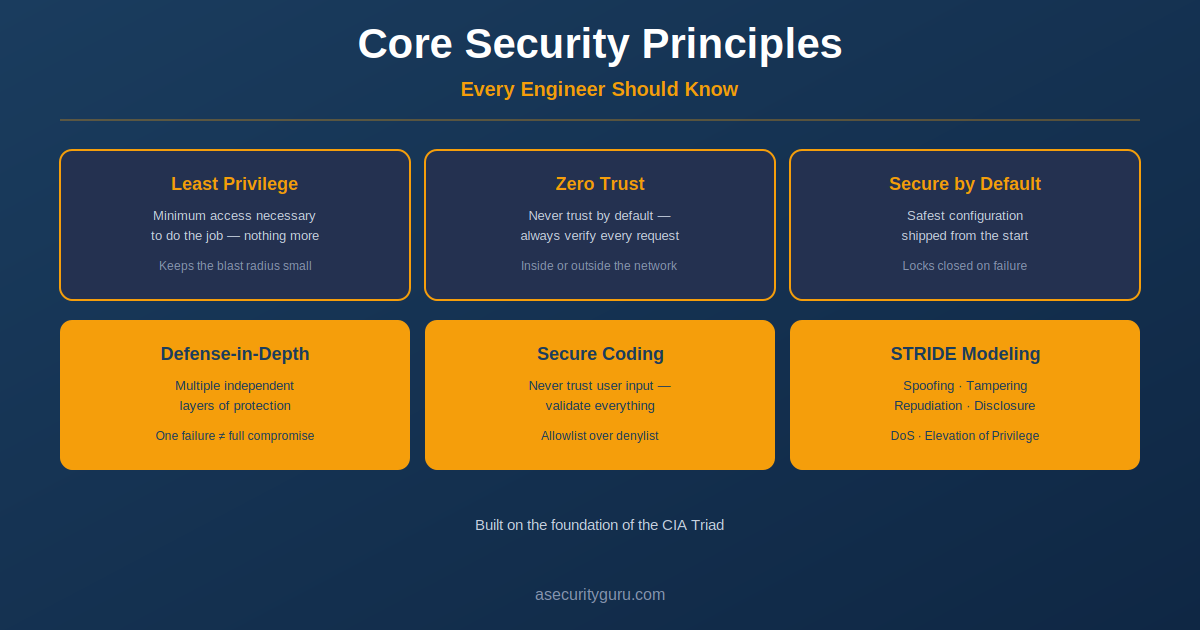
The Principle of Least Privilege is one of the simplest ideas in security, and one of the most consistently violated in practice. It states that any user, program, or process should be granted only the minimum access necessary to do its job — nothing more.
This matters because it directly limits the damage from a compromise. If an account or application is breached, the attacker only inherits whatever access that account actually had. When unnecessary privileges were never granted in the first place, the “blast radius” of a breach stays small — even when the attacker successfully gets in.
Zero Trust: Always Verify, Never Assume
Zero Trust Architecture (ZTA) builds directly on least privilege, but extends it into an entire philosophy of network design. Traditional security models often trusted anyone already inside the corporate network by default — once you were past the perimeter, you were largely trusted. Zero Trust rejects that assumption entirely.
Under Zero Trust, no user or device is trusted automatically, regardless of whether the request originates inside or outside the network. Every request must be authenticated, authorized, and validated. This approach protects organizations against exactly the scenarios that perimeter-based security misses: stolen credentials, compromised devices, and insider threats — all of which look like “trusted” traffic under the old model.
Building Security In: Secure Design Principles
Good security starts with good design, not with patches applied after the fact. Several of the foundational ideas here trace back to Saltzer and Schroeder’s classic work on secure system design, and they still hold up decades later.
Economy of Mechanism — Keep systems as simple as possible. Complexity is where vulnerabilities hide; the more moving parts a system has, the harder it is to secure and to reason about.
Complete Mediation — Every single request to access a resource should be checked, every time. Systems should never assume that access granted once is still valid without re-confirming it.
Open Design — Security should never depend on keeping the system’s design secret. Even when your architecture is fully public, it should still hold up — protected by strong encryption, solid authentication, and well-designed access controls, not obscurity.
Secure by Default: Start From the Safest Configuration
A system that’s Secure by Default ships with the most protective settings enabled from the start — security shouldn’t be something a user or administrator has to remember to turn on. When something fails or an error occurs, the system should default to a locked, restrictive state rather than falling open into unrestricted access.
In practice, this means requiring strong, unique credentials on first deployment, disabling verbose or debug logging in production, and denying access by default unless explicitly authorized. Done properly, this protects the system even when users never touch the default configuration at all — which, realistically, is most users.
Defense-in-Depth: Multiple Layers of Protection
No single security control stops every attack. Defense-in-Depth is the practice of layering multiple, independent protections so that if one fails, others are still standing between the attacker and the system.
An attacker who bypasses authentication, for example, might still be stopped by network segmentation or endpoint detection — meaning a single failed control doesn’t mean the whole system is compromised. In practice, this usually means combining several layers together:
- Network segmentation
- Endpoint Detection and Response (EDR)
- Security monitoring
- Administrative policies and processes
- Physical security controls
None of these layers is sufficient alone. Together, they make a system meaningfully more resilient against real-world attacks.
Secure Coding: Never Trust User Input
Until proven otherwise, all external input should be treated as untrustworthy — this is one of the oldest rules in secure coding, and still one of the most frequently ignored. Input validation should happen as early as possible, using two complementary checks:
- Syntactic validation — confirming the data is in the expected format
- Semantic validation — confirming the data actually makes sense in context, not just that it’s well-formed
Where possible, developers should use allowlisting (explicitly defining what input is permitted) rather than denylisting (trying to block known-bad input) — denylists are reactive by nature and attackers routinely find ways around them. Solid input validation remains one of the most effective defenses against common vulnerabilities like SQL injection and cross-site scripting.
Threat Modeling with STRIDE
Once these principles are applied, the next step is validating the design by actively thinking through how an attacker might try to break it. STRIDE is one of the most widely used frameworks for structuring that exercise:
| Threat | Description |
|---|---|
| S — Spoofing | Impersonating a legitimate user or system |
| T — Tampering | Unauthorized modification of data |
| R — Repudiation | Denying an action due to insufficient logging |
| I — Information Disclosure | Exposure of confidential information |
| D — Denial of Service | Preventing legitimate access to a service |
| E — Elevation of Privilege | Gaining more permissions than intended |
Working through each of these categories against your own system design — before it’s built, not after — surfaces risks while they’re still cheap to fix.
Raghu’s Expert Take
Repudiation is the one people forget. Teams build strong authentication and access controls, then discover during an incident that they can’t actually prove who changed the logs, because the logging system was not built during the design phase but after the deployment was complete. By the time you need the audit trail, it’s too late to add it.
Frequently Asked Questions
Is least privilege the same thing as Zero Trust? They’re related but not identical. Least privilege is a principle about how much access any given user or process should have. Zero Trust is a broader architectural approach that applies continuous verification to every request, regardless of where it originates. Zero Trust relies heavily on least privilege, but least privilege can be applied even in environments that aren’t fully Zero Trust.
Do I need to apply all of these principles at once? No single project needs to implement everything simultaneously. Most teams start with the highest-impact, lowest-effort changes — often least privilege and basic input validation — and layer in Zero Trust, defense-in-depth, and formal threat modeling as the system and the team mature.
What’s the difference between allowlisting and denylisting? Allowlisting explicitly defines what’s permitted and rejects everything else by default. Denylisting tries to block known-bad input while allowing everything else through. Allowlisting is generally more secure because it doesn’t depend on anticipating every possible attack pattern in advance.
Is STRIDE the only threat modeling framework worth knowing? No, but it’s one of the most widely taught and applied, largely because it’s easy to remember and maps cleanly onto common vulnerability categories. Other frameworks like PASTA and DREAD exist and are used for different contexts — but STRIDE remains a strong default starting point for most teams.
How do these principles apply to AI systems, not just traditional applications? The same underlying ideas apply, but the practical implementation shifts. Least privilege now needs to cover AI agents and their access to tools and data. Threat modeling frameworks are being explicitly adapted for AI systems — see our AI Security 101 post for how these threat surfaces map onto AI-specific risks.
Next Steps
These principles work together as a system, not a checklist to complete once. For a deeper look at the foundation they all serve, read The CIA Triad Explained. If you want to see these principles applied in a real DevSecOps pipeline — SAST, SCA, and secure defaults enforced automatically — check out Master GitOps with Terraform, AKS and AWS or Provision AWS EC2 with Jenkins Using Terraform.
For structured, hands-on learning across Application Security and DevSecOps, explore Raghu’s courses on Udemy.
Sources and References
- OWASP Secure Coding Practices — input validation and secure coding reference
- NIST Zero Trust Architecture (SP 800-207) — the authoritative Zero Trust reference
- Saltzer and Schroeder, “The Protection of Information in Computer Systems” — the original 1975 paper defining secure design principles
- Microsoft STRIDE Threat Modeling — official reference for the STRIDE framework
- ASecurityGuru: The CIA Triad Explained
Raghu the Security Expert has 20 years of experience in Security, DevSecOps, AI Security, and Penetration Testing. He has helped 80,000+ students upskill themselves in DevSecOps, Application Security, and AI Security. Follow his work on LinkedIn, YouTube, and Udemy.