Introduction
When I was a kid, I used to play Super Mario game a lot. This time when I was setting up a Hybrid DevSecOps Cloud pipeline, I thought of reliving my childhood by deploying the Super Mario game using a DevSecOps pipeline.
If you’ve read my introduction to GitOps, you know the core idea: instead of manually running kubectl apply or clicking through cloud consoles, your Git repository becomes the single source of truth for both your infrastructure and your application deployments.
In this post, I’ll walk you through a real, end-to-end GitOps case study — built around a fun example (deploying the classic Super Mario game), but using exactly the same tools and patterns you’d use for production workloads:
- Terraform to provision infrastructure across two clouds — Azure and AWS
- GitHub Actions to build the CI pipeline
- SonarQube for static application security testing (SAST)
- Docker to containerise the application
- Trivy for container image vulnerability scanning
- ArgoCD to implement pull-based GitOps deployment to Kubernetes
By the end, you’ll understand how all these pieces fit together into a single DevSecOps pipeline — and why each tool earns its place.
Architecture Overview
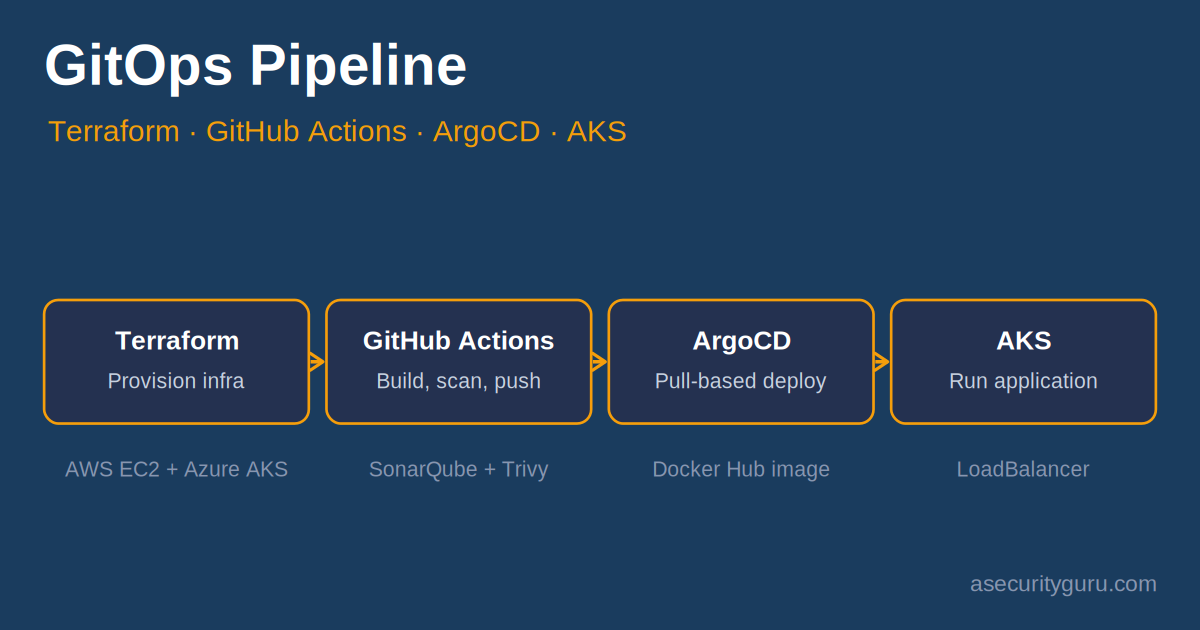
Before diving into each tool, here’s the big picture of what we’re building:
- Terraform provisions an Azure Kubernetes Service (AKS) cluster (where the application will run) and an AWS EC2 instance (which hosts Docker and SonarQube for our CI tooling).
- A developer pushes code to the GitHub repository for the Mario game.
- GitHub Actions triggers automatically, running a pipeline that:
- Scans the source code with SonarQube (SAST)
- Builds a Docker image and pushes it to Docker Hub
- Scans the Docker image with Trivy (container vulnerability scanning)
- ArgoCD, running inside the AKS cluster, continuously watches the GitHub repo for changes to the Kubernetes deployment manifest.
- When ArgoCD detects a new image tag, it pulls the updated image from Docker Hub and deploys it to AKS — this is the “pull-based” GitOps mechanism.
- ArgoCD exposes the application via a LoadBalancer, making the Mario game playable over the internet.
This split — AWS for CI tooling, Azure for the runtime — is deliberate. It demonstrates that GitOps and Terraform aren’t tied to a single cloud provider, and it mirrors real-world setups where organisations often have CI infrastructure in one cloud and production workloads in another.
Step 1: Provisioning Infrastructure with Terraform
Everything starts with Terraform. Rather than manually clicking through the Azure and AWS consoles, we define our entire infrastructure as code.
What Terraform creates:
- An Azure Kubernetes Service (AKS) cluster — this is where our containerised Mario game will eventually run, managed by ArgoCD
- An AWS EC2 instance — this hosts Docker and SonarQube, acting as our build and scanning environment
Prerequisites before running Terraform:
- An active Azure subscription
- An active AWS account
- AWS key pairs generated for EC2 access
- Terraform CLI installed locally, with the Azure and AWS providers configured
We will download the Azure and AWS Terraform providers and configure on our local system during initial setup. We will also provide a walkthrough of how to setup Terraform CLI on local system.
The advantage of this approach is repeatability — if this infrastructure needs to be torn down and recreated (for a new environment, or after a demo), it’s a terraform apply away rather than a manual checklist.
Step 2: Setting Up GitHub Actions
With infrastructure in place, the next step is wiring up the CI pipeline.
- Clone the Mario game repository to your local machine
- Open the project in Visual Studio Code
- Create a
.github/workflows/directory in the repo - Write a GitHub Actions workflow YAML file that will define our pipeline stages
This workflow file becomes the heart of the GitOps pipeline — every stage from here on (SonarQube scanning, Docker builds, Trivy scanning) gets defined as a job or step inside this YAML file.
Step 3: Static Code Analysis with SonarQube
Before we build anything, we want to know if the source code itself has problems — bugs, code smells, or security vulnerabilities.
Why SonarQube, and why on EC2?
SonarQube runs as a server that GitHub Actions can call out to. In this case study, SonarQube is installed on the AWS EC2 instance we provisioned with Terraform in Step 1. GitHub Actions is configured to send the Mario source code to this SonarQube server for analysis as part of the pipeline.
What SonarQube checks for:
- Code quality issues (duplicated code, complexity, maintainability)
- Security vulnerabilities in the source code itself (this is the SAST — Static Application Security Testing — piece of DevSecOps)
- Bugs and code smells that could cause runtime issues
If SonarQube’s quality gate fails, the pipeline can be configured to stop here — preventing insecure or low-quality code from ever reaching a container image.
Step 4: Dockerizing the Application
With the code scanned, the next stage is containerisation.
Static tags first:
We start simple — build a Docker image for the Mario game using a static tag (e.g., mario:latest or mario:v1), then push it to Docker Hub. This lets us verify the basic build-and-push mechanics work before adding complexity.
Then, dynamic tags:
Static tags work for a demo, but they’re a problem in production — if every build overwrites latest, you lose the ability to roll back to a specific previous version, and ArgoCD has no reliable way to detect “a new version is available.”
The enhancement here is to write pipeline logic that generates a dynamic tag for each build — typically based on the Git commit SHA, a build number, or a timestamp. Each push to the repo now produces a uniquely-tagged Docker image in Docker Hub (e.g., mario:a1b2c3d).
This dynamic tagging is what makes the next step — ArgoCD’s pull-based deployment — actually work.
name: "Build and push Super Mario Docker image with dynamic tag to Docker Hub"

env:
  VERSION: $(( $(cat version.txt) + 1 ))

jobs:

  build_push_supermario_docker_image:
    runs-on: ubuntu-latest

    steps:
      - name: Checkout Repository
        uses: actions/checkout@v3

      - name: Login to Docker Hub
        run: echo "${{ secrets.DOCKERHUB_TOKEN }}" | docker login -u "${{ secrets.DOCKERHUB_USERNAME }}" --password-stdin

      - name: Build and Push Docker Image
        run: |
          docker build -t docker.io/raghuthesecurityexpert/supermariogitopsproject:${{ env.VERSION }} .
          docker push docker.io/raghuthesecurityexpert/supermariogitopsproject:${{ env.VERSION }}
      - name: Compute version
  run: echo "VERSION=$(( $(cat version.txt) + 1 ))" >> $GITHUB_ENV
Step 5: Pull-Based GitOps Deployment with ArgoCD
This is where the “Ops” part of GitOps comes together.
Setting up ArgoCD:
- Create a new Application in ArgoCD
- Connect that Application to the Mario game’s GitHub repository
- Write a Kubernetes deployment YAML manifest that references the Mario Docker image
The pull-based mechanism:
This is the key concept that distinguishes GitOps from a traditional CI/CD push-based deploy:
- In a push-based model, your CI pipeline (GitHub Actions) would directly run
kubectl applyagainst your cluster — meaning your CI system needs credentials to your production cluster. - In a pull-based model (what ArgoCD does), the CI pipeline only updates the image tag reference in a Git repository. ArgoCD, running inside the cluster, continuously watches that repository. When it sees the manifest has changed (a new image tag), it pulls the new image and applies the change itself.
This is more secure (your CI system never has direct cluster access) and gives you a complete audit trail — every deployment is a Git commit.
Exposing the application:
Once ArgoCD deploys the updated Mario image to AKS, it also provisions a LoadBalancer service, giving the game a public IP/URL that’s playable in a browser — a satisfying way to confirm the entire pipeline worked end to end.
Putting It All Together: The End-to-End Pipeline
Here’s the full flow, from commit to deployment:
Developer pushes code
        │
        ▼
GitHub Actions triggered
        │
        ├──▶ SonarQube SAST scan (on AWS EC2)
        │
        ├──▶ Docker build (dynamic tag)
        │         │
        │         ▼
        │     Trivy container scan
        │         │
        │         ▼
        │     Push to Docker Hub
        │
        └──▶ Update K8s manifest in Git (new image tag)
                  │
                  ▼
        ArgoCD detects change (running in AKS)
                  │
                  ▼
        ArgoCD pulls new image, deploys to AKS
                  │
                  ▼
        LoadBalancer exposes app to internet
Why This Is “DevSecOps”, Not Just “GitOps”
You’ll notice security scanning woven throughout this pipeline — SonarQube scanning source code, and Trivy scanning the resulting container image for known CVEs and misconfigurations. This is what turns a GitOps pipeline into a DevSecOps pipeline: security isn’t a separate gate at the end, it’s embedded at every stage — source code, image, and (via ArgoCD’s audit trail) deployment.
GitOps describes how deployments happen (Git as source of truth, pull-based reconciliation). DevSecOps describes what runs at each stage (security scanning shifted left). The two concepts complement each other — this pipeline is both.
Raghu’s Expert Take
This pull based mechanism help to make sure that the latest version get’s deployed safely after the security checks pass in the DevSecOps pipeline. If the time to market is of utmost importance and security checks needs to be embedded into the pipeline, then pull based GitOps approach with SAST, SCA scans along with quality gates can help to achieve the safe deployments in production in real-time.
Watch the Full Walkthrough
For a visual walkthrough of this entire case study, watch the companion video below:
Frequently Asked Questions
What’s the difference between GitOps and DevOps?
DevOps is a broad set of cultural practices and tools for collaboration between development and operations teams. GitOps is a specific implementation pattern within DevOps — it uses Git as the single source of truth for both infrastructure and application state, with automated reconciliation (often pull-based) keeping the live environment in sync with what’s declared in Git.
Why use a pull-based deployment model with ArgoCD instead of a traditional push-based pipeline?
Pull-based deployment means your CI/CD system never needs direct credentials to your production cluster — reducing your attack surface significantly. It also means the cluster’s actual state is continuously reconciled against Git, so configuration drift gets automatically corrected, and every change has a Git commit as an audit record.
Why does this case study use both Azure and AWS?
It demonstrates that GitOps tooling (Terraform, ArgoCD, GitHub Actions) is cloud-agnostic. In practice, many organisations run CI/CD tooling in one cloud while deploying production workloads to another — often for cost, compliance, or historical reasons. Terraform makes managing this multi-cloud setup as code straightforward.
Where does Trivy fit into a DevSecOps pipeline?
Trivy scans container images for known vulnerabilities (CVEs) in OS packages and application dependencies, as well as misconfigurations. Running it in the CI pipeline — after the Docker build but before the image reaches production — catches vulnerable dependencies before they’re deployed, rather than discovering them after the fact.
Next Steps
If you want to go deeper into building secure CI/CD pipelines like this one — including hands-on labs covering Terraform, GitHub Actions, container security, and GitOps with ArgoCD — these topics are covered in depth in my DevSecOps courses on Udemy.
For the latest CVEs affecting tools in this stack (Docker, Kubernetes, Terraform providers), check my free Live CVE Tracker.
About the Author
Raghu the Security Expert has 20 years of experience in Security, DevSecOps, AI Security, and Penetration Testing. He has helped 80,000+ students upskill themselves in DevSecOps, Application Security, and AI Security. Follow his work on LinkedIn, YouTube, and Udemy.