PAM or Privilege access management is becoming popular each day. There are few reasons – one is that service accounts are increasing each day in the cloud and on-premise, second is that auditing/recording PAM events is required to be in compliant with many regulations as well.
Every time you unlock your computer, log into an application, or install new software, you’re relying on one of the most fundamental pillars of cybersecurity: user accounts and privilege management. These mechanisms determine who has access to a system, what resources they can use, and what actions they’re allowed to take.
Modern operating systems — Windows, Linux, macOS — are all built on a shared assumption: not every user should have complete control. Instead, each user gets a distinct identity and a well-defined set of permissions based on their actual role. This layered approach is what protects systems against external attacks, insider misuse, and simple human error alike.
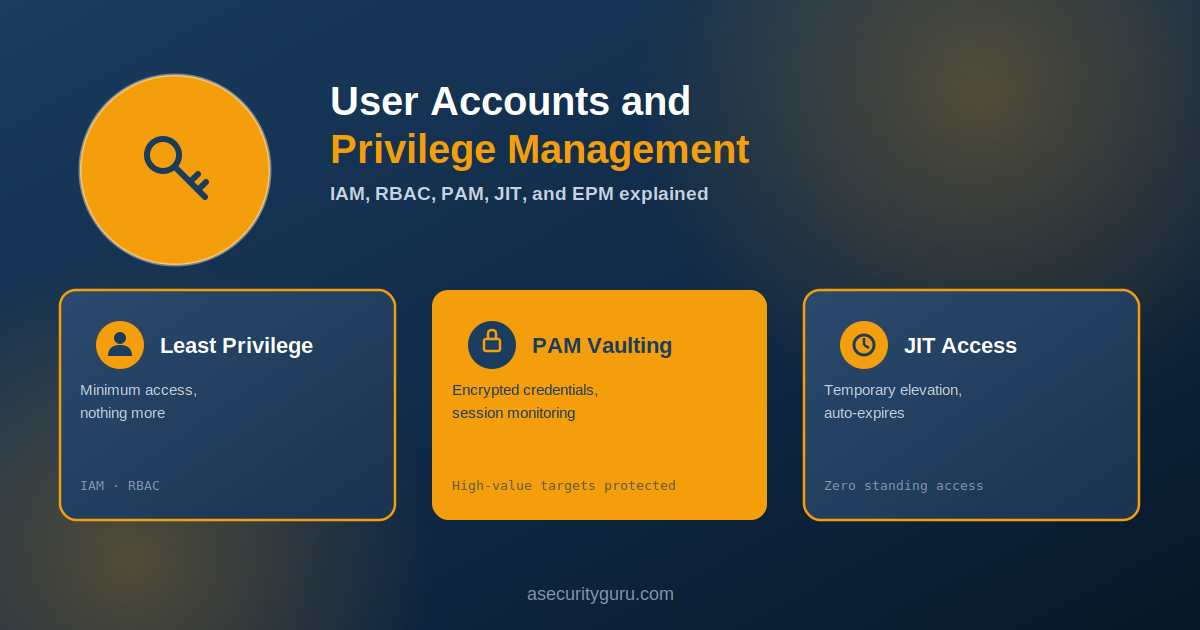
As organizations grow, privilege control extends well beyond individual local accounts. Technologies like Identity and Access Management (IAM), Role-Based Access Control (RBAC), Privileged Access Management (PAM), Just-In-Time (JIT) Access, and Endpoint Privilege Management (EPM) let organizations secure privileged accounts at scale without grinding operational efficiency to a halt.
Why User Accounts Matter
A user account is more than a username and password — it’s what the operating system uses to authenticate users and grant access. Every account performs four core functions:
- Verify user identity through passwords, biometrics, or security keys
- Control access to files, applications, and system resources
- Separate user data and settings from other users
- Record activity for auditing and accountability
Most operating systems provide four common account types:
| Account Type | Purpose |
|---|---|
| Administrator (Root) | Full system control |
| Standard User | Daily work with limited permissions |
| Guest User | Temporary, restricted access |
| Service/System Account | Runs operating system services |
Each account is tied to a unique identity — a Security Identifier (SID) in Windows, or a User ID (UID) in Linux — which is what lets the operating system reliably enforce security policy against that specific account, every time.
Permissions, Privileges, and the Principle of Least Privilege
Permissions and privileges get confused constantly, but they serve genuinely different functions:
- Permissions determine access to specific resources — reading a file, modifying a folder
- Privileges enable administrative actions — installing software, creating user accounts, changing security settings
Privileged accounts are high-value targets precisely because they carry more power. This is exactly why operating systems follow the Principle of Least Privilege (PoLP): users and applications should only be granted the minimum permissions actually necessary to do their job. Limiting unused privileges directly limits the damage malware, insider threats, and honest mistakes can cause.
Administrator Accounts and Privilege Escalation
Administrator credentials allow installing software, managing users, configuring security settings, and accessing protected system resources — all genuinely necessary for IT management, and exactly why administrator accounts are so valuable to attackers.
Privilege escalation is the attack pattern where someone gains more access than they were ever supposed to have:
- Vertical privilege escalation — a regular user gains administrator or root access
- Horizontal privilege escalation — an attacker gains access to a different user’s account, without necessarily increasing their overall privilege level
Modern operating systems push back against this with features like User Account Control (UAC) in Windows and sudo in Linux/macOS — both require explicit consent before any administrative action actually executes, adding a deliberate checkpoint rather than granting silent elevated access.
Group-Based Access Control
Managing permissions individually stops being realistic once an organization grows past a certain size. Instead, administrators assign users into groups — IT administrators, developers, HR, finance — and grant permissions to those groups rather than to each person separately.
Users then inherit access based on their role, which reduces configuration errors, simplifies administration, and keeps access consistent across similar roles rather than depending on whoever happened to set up each individual account.
Modern Enterprise Privilege Management
Manually managing thousands of accounts becomes both dangerous and genuinely impractical as an organization scales. This is where dedicated identity and privilege management systems take over.
Identity and Access Management (IAM)
IAM centralizes authentication and authorization across an entire organization. A core piece of this is provisioning and deprovisioning — automatically creating accounts when employees join, and immediately revoking access the moment they leave or change roles. Beyond saving administrative effort, this closes a real security gap: former employees retaining access they should no longer have.
IAM also typically includes Role-Based Access Control (RBAC), which assigns access based on job function rather than individual identity. Finance teams get access to accounting systems, developers get source code repositories, HR gets employment records — RBAC keeps this consistent while directly supporting the Principle of Least Privilege.
Privileged Access Management (PAM)
Privileged accounts carry elevated permissions to manage servers, operating systems, and critical business applications — which makes them prime targets. PAM systems protect these credentials through credential vaulting, storing passwords in encrypted vaults rather than exposing them directly to users, often with automatic password rotation built in.
PAM also provides session monitoring — recording privileged activity for incident investigation, auditing, and compliance, with the ability to review or terminate suspicious sessions in real time rather than discovering the problem after the fact.
Just-In-Time (JIT) Access
Rather than granting permanent administrator rights, JIT Access provides elevated permissions only when genuinely needed. A user requests administrator access with a valid business reason, receives temporary privileges, and automatically loses that elevated access once the task is complete. This preserves productivity while meaningfully shrinking the attack surface — there’s no standing elevated access sitting around for an attacker to find.
Endpoint Privilege Management (EPM)
A large share of real-world attacks start by exploiting local administrator rights on individual workstations. EPM removes permanent administrator access from endpoints while still allowing temporary elevation for approved applications or maintenance tasks — letting users get legitimate work done without leaving unrestricted system access sitting around for malware to exploit.
Zero Trust and Privilege Management
The Zero Trust model — the principle that no user or device should be trusted by default — is becoming standard practice in modern security architecture. Instead of trusting anything already “inside” the network, every access request gets continuously validated based on location, risk level, device health, and user identity.
IAM, RBAC, PAM, JIT, and EPM are the practical technologies that make Zero Trust actually enforceable — ensuring users only get access precisely when they need it, rather than by default.
Raghu’s Expert Take
I would advise organizations to use the native services like Azure PIM, JIT to start implementing PAM solutions in their environment. Once they have configured these tools, they can forward the logs to splunk to track and setup alerts on such privilege events.
Best Practices
- Use standard user accounts for everyday work
- Apply the Principle of Least Privilege
- Implement IAM and RBAC for centralized access control
- Secure privileged accounts with PAM
- Enable Just-In-Time administrative access
- Deploy Endpoint Privilege Management
- Require Multi-Factor Authentication (MFA) for privileged users
- Review permissions regularly and remove unnecessary access
- Disable inactive accounts promptly
- Monitor privileged activity and keep systems updated
Frequently Asked Questions
What’s the difference between vertical and horizontal privilege escalation? Vertical privilege escalation means gaining a higher privilege level than you started with — a regular user becoming an administrator. Horizontal privilege escalation means gaining access to a different account at the same privilege level — accessing another regular user’s data or session without ever becoming an administrator.
Do small organizations really need IAM/PAM, or is that only for large enterprises? The core principles (least privilege, centralized access review, removing standing admin access) matter at any size. Full IAM/PAM platforms are typically justified once account volume and turnover make manual management genuinely impractical — but the underlying practices are worth adopting early, well before that point.
How is Just-In-Time access different from just granting temporary admin rights manually? JIT access is specifically built to automate the request-approve-expire cycle, typically tied to a specific, auditable business justification, and enforces automatic expiration without relying on someone remembering to revoke access later. Manually granting and later remembering to revoke temporary rights is exactly the kind of process that fails silently at scale.
Why do attackers specifically target service accounts? Service accounts often carry broad permissions to do their job, are rarely monitored as closely as human user accounts, and frequently use static, long-lived credentials rather than rotating passwords or MFA. That combination — high privilege, low visibility, weak credential hygiene — makes them an efficient target.
Does enabling MFA make PAM or JIT unnecessary? No — they solve different problems. MFA verifies identity at login. PAM and JIT control what that verified identity is actually allowed to do, and for how long. A compromised but MFA-protected account can still cause serious damage if it retains standing, unmonitored privileged access.
Next Steps
For the foundational principle behind everything covered here, see Core Security Principles Every Engineer Should Know, particularly the least-privilege and zero-trust sections. For how privilege issues get exploited in practice, see Threat Modeling for Agentic AI, which covers how excessive privilege applies to AI agents specifically.
For structured, hands-on learning across DevSecOps, Application Security, and AI Security, explore Raghu’s courses on Udemy.
Sources and References
- NIST SP 800-53: Access Control — federal reference framework for access control and least privilege
- Microsoft: How User Account Control Works — official UAC technical reference
- CISA: Zero Trust Maturity Model — official Zero Trust reference framework
- ASecurityGuru: Core Security Principles Every Engineer Should Know
- ASecurityGuru: Threat Modeling for Agentic AI
Raghu the Security Expert has 20 years of experience in Security, DevSecOps, AI Security, and Penetration Testing. He has helped 80,000+ students upskill themselves in DevSecOps, Application Security, and AI Security. Follow his work on LinkedIn, YouTube, and Udemy.