

GitHub Repo: genai-rest-api-jira-integration-for-testcase-creation Stack: Spring Boot, Spring AI, Ollama (Mistral), Jira REST API
In order to completely automate the process of test case creation using AI and not to expose the confidential data, I started working on creating an application that can expose its APIs and can integrate with our JIRA instance. After working on it for few days, I created this application which could use an open source model on local system and could generate my QA manual and automation test cases by reading the acceptance criteria of my user stories from JIRA.
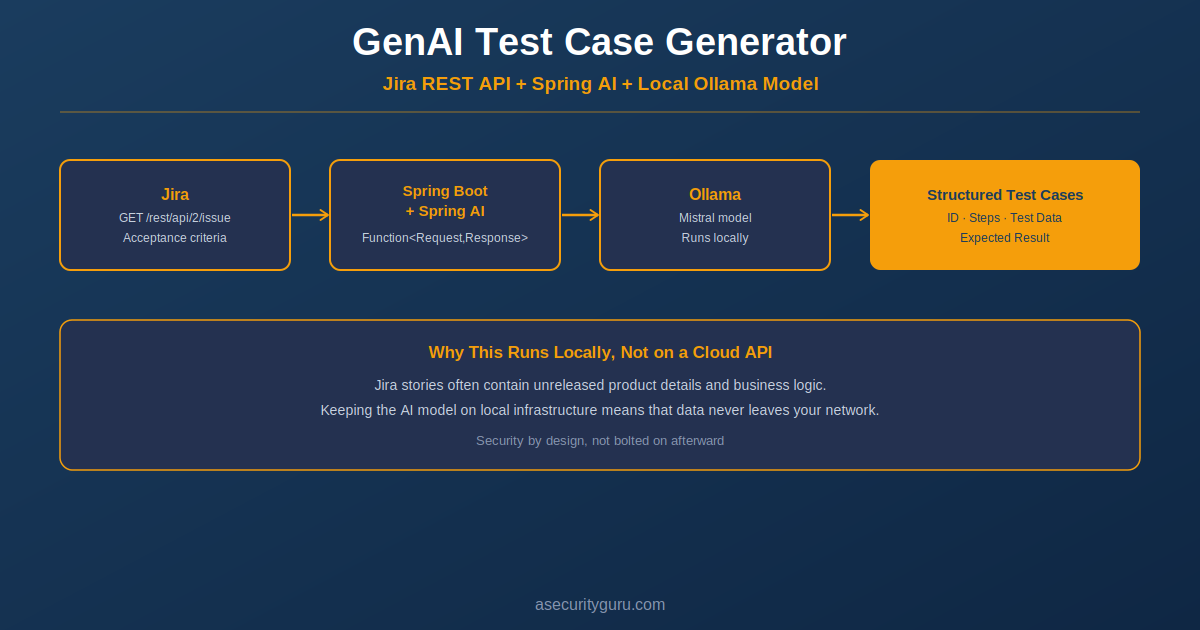
Writing test cases from Jira user stories is one of those QA tasks that’s necessary but repetitive — read the acceptance criteria, think through the happy path, the edge cases, the negative scenarios, and write it all up in a consistent format. This post walks through a small Spring Boot application that automates the first draft of that work: it pulls a user story directly from Jira, feeds its acceptance criteria to a locally-running AI model, and returns structured test cases — Test Case ID, Steps, Test Data, Description, and Expected Result — as a single API call.
What makes this implementation worth a closer look isn’t just “AI writes test cases” — it’s how it’s wired together: Spring AI’s function-calling pattern, a real Jira REST integration, and a locally-hosted model via Ollama rather than sending your Jira story data to a third-party cloud API.
Why Ollama Instead of a Cloud LLM API
This is the detail worth calling out first, because it’s a deliberate architectural choice with real security implications. The application uses spring-ai-starter-model-ollama, pointing at a Mistral model running locally through Ollama — not OpenAI, not Anthropic, not any cloud API.
For a QA tool that’s going to read your Jira stories — which often contain internal product details, unreleased features, or business logic — that matters. Every acceptance criteria description sent through this pipeline stays on infrastructure you control. There’s no third-party API call, no data leaving your network, no cloud provider’s data retention policy to worry about. This is a good illustration of what “AI security by design” actually looks like in practice, not just in theory: the security decision (keep sensitive data local) is baked into the architecture choice, not bolted on afterward.
How the Pieces Fit Together
The application has four main components, and understanding how they connect is more useful than looking at any one file in isolation.
JiraApiProperties — a simple configuration class that holds your Jira username, API token, and base URL, loaded from application.properties via Spring’s @ConfigurationProperties. Nothing complex here, but it’s the foundation everything else depends on.
JiraDataService — this is where the actual Jira integration happens. It implements Java’s Function<Request, Response> interface, which is significant — more on why below. Internally, it uses Spring’s reactive WebClient to call Jira’s REST API directly:
String issueEndpoint = "/rest/api/2/issue/" + request.storyKey();

String jsonResponse = webClient.get()
        .uri(issueEndpoint)
        .retrieve()
        .bodyToMono(String.class)
        .block();
That’s a call to Jira’s GET /rest/api/2/issue/{issueKey} endpoint — the standard way to fetch full issue details, authenticated via Basic Auth (username + API token) configured once in the WebClient builder. The response comes back as a full Jira issue JSON payload, and extractAcceptanceCriteria() parses out just the fields.description node using Jackson’s JsonNode tree model — a clean way to pull one field out of a large JSON response without needing to deserialize the entire Jira issue schema into a Java object.
JiraFunctionConfig — registers JiraDataService as a Spring @Bean, with a @Description annotation explaining what it does. This annotation isn’t just documentation — in Spring AI’s function-calling model, this description is what the AI model actually reads to understand when and how to use this function. It also validates the Jira configuration on startup, failing fast with a clear error if the API URL, token, or username is missing — better to fail at boot time than on the first real request.
JiraInquiryController — the REST endpoint itself. This is where the two pieces actually connect: it calls jiraFunction.apply() to get the acceptance criteria from Jira, builds a prompt around it, and sends that prompt to the AI model through Spring AI’s ChatClient:
String prompt = "Based on the following acceptance criteria, generate detailed test cases "
        + "with Test Case ID, Steps, Test Data, Test Case Description, and Expected Result:\n\n"
        + jiraResponse.acceptanceCriteria();

String aiResponse = chatClient.prompt()
        .user(prompt)
        .call()
        .content();
That’s the entire AI interaction — a single prompt, sent to whatever model Spring AI is configured to use (Mistral via Ollama in this case), with the response returned directly as the API’s output.
Why Function<Request, Response> Matters Here
It would be easy to skip past JiraDataService implements Function<Request, Response> as a small implementation detail, but it’s actually the most interesting architectural decision in this codebase. Spring AI supports registering Java functions as tools the AI model can call — this is the same underlying pattern behind what’s often called “function calling” or “tool use” in AI agent architectures.
In this particular implementation, the controller calls jiraFunction.apply() directly rather than letting the model decide when to invoke it — so in its current form, the Jira lookup always happens before the prompt is built. But the Function<Request, Response> shape, combined with the @Description annotation on the bean, is exactly the pattern Spring AI needs to let the model call this function autonomously instead — deciding for itself, based on the user’s query, whether it needs to look up a Jira story before responding. That’s a meaningful next step from “AI that processes text I already fetched” to “an agent that decides what data it needs and goes and gets it.”
The Part Worth Learning From: Secrets in Configuration
One thing worth flagging directly, because it’s a genuinely common mistake in exactly this kind of project: application.properties is where the Jira username, API token, and URL live — and if that file gets committed to a public repository with real credentials filled in, those credentials are now public, indexed, and potentially scraped by automated credential-harvesting bots within minutes of the push.
The fix is standard practice, and worth applying to any project like this one:
- Never commit
application.properties(or any file with real secrets) — add it to.gitignore - Commit an
application-example.propertiesinstead, with placeholder values, so anyone cloning the repo knows what to configure - For anything beyond local experimentation, load credentials from environment variables or a secrets manager (AWS Secrets Manager, HashiCorp Vault, or even Spring Cloud Config with encryption) rather than a plaintext properties file at all
- If a real credential ever does get committed, rotating it is not optional — assume it’s compromised the moment it’s pushed, even if the repo is later made private or the commit is removed, since git history and any forks may still contain it
This is exactly the kind of practical secrets-management lesson that’s easy to nod along to in the abstract and easy to miss in a fast-moving side project — which is precisely why it’s worth calling out explicitly here.
Trying It Yourself
Prerequisites:
- Java 17
- Gradle
- Ollama installed locally, with the Mistral model pulled (
ollama pull mistral) - A Jira Cloud instance with an API token (generate one here)
Setup:
git clone https://github.com/asecurityguru/genai-rest-api-jira-integration-for-testcase-creation.git
cd genai-rest-api-jira-integration-for-testcase-creation
Update src/main/resources/application.properties with your own Jira credentials:
properties
jira.username=your-email@domain.com
jira.apiToken=YOUR_JIRA_API_TOKEN
jira.apiUrl=https://your-instance.atlassian.net
Run it:
./gradlew clean build bootRunCall the endpoint (with Ollama running locally and a valid Jira story key):
curl "http://localhost:8080/api/v1/jira-story?storyKey=SCRUM-2"The response comes back as AI-generated test cases based directly on that story’s acceptance criteria.
Raghu’s Expert Take
Generative AI helps software testers and QA Engineers to automate their day to day work but it is very important to ensure that we review the output generated by the AI and enhance it with our experience. Secondly, we should not input any sensitive information in our prompts while sending our user story acceptance criteria to the AI models.
Frequently Asked Questions
Why use Ollama instead of a hosted model like GPT-4 or Claude? Running locally through Ollama keeps Jira story data — which is often sensitive, unreleased product information — entirely within your own infrastructure. No data is sent to a third-party API. The tradeoff is that local models are typically smaller and less capable than the largest hosted models, so output quality should be evaluated for your specific use case.
Does this replace a QA engineer writing test cases? No — it produces a first draft based on the acceptance criteria text. A human still needs to review the output for accuracy, completeness, and edge cases the AI may have missed, especially for anything business-critical. It’s a starting point that saves the blank-page problem, not a replacement for QA judgment.
What Jira API version does this use, and does it matter? It calls Jira’s REST API v2 (/rest/api/2/issue/{key}). Jira also has a v3 API with some differences in response structure, particularly around rich-text fields. If your Jira instance’s description field uses Atlassian Document Format (ADF) rather than plain text, the parsing logic would need to be adjusted to extract text from the ADF structure rather than treating it as a plain string.
Can this be extended to write to Jira, not just read from it? Yes — the same WebClient pattern used for the GET request could be extended with a POST to Jira’s issue or comment endpoints, for example to attach the generated test cases back onto the original story, or create linked test-case sub-tasks automatically.
Is committing an API token to a properties file ever acceptable? Not for anything beyond a completely local, disposable, throwaway experiment that never gets pushed anywhere. Even then, it’s a habit worth avoiding — the safer default is always a .gitignore‘d config file plus an example template, so committing real credentials by accident becomes structurally harder to do.
Next Steps
For the broader picture of how to secure the credentials, pipelines, and data behind projects like this one, see Core Security Principles Every Engineer Should Know. For the threat model behind AI systems that call external tools and APIs — exactly the pattern this Spring AI function represents — see Threat Modeling for Agentic AI.
For structured, hands-on learning across AI Security and DevSecOps, explore Raghu’s courses on Udemy.
Sources and References
- Spring AI Documentation — official reference for Spring AI’s function-calling and ChatClient APIs
- Jira Cloud Platform REST API — official documentation for the endpoints used in this project
- Ollama — local LLM runtime used for this integration
- ASecurityGuru: Threat Modeling for Agentic AI
- ASecurityGuru: Core Security Principles Every Engineer Should Know
Raghu the Security Expert has 20 years of experience in Security, DevSecOps, AI Security, and Penetration Testing. He has helped 80,000+ students upskill themselves in DevSecOps, Application Security, and AI Security. Follow his work on LinkedIn, YouTube, and Udemy.
That sounds like a really practical approach to testing. Using Ollama locally keeps things private and efficient.